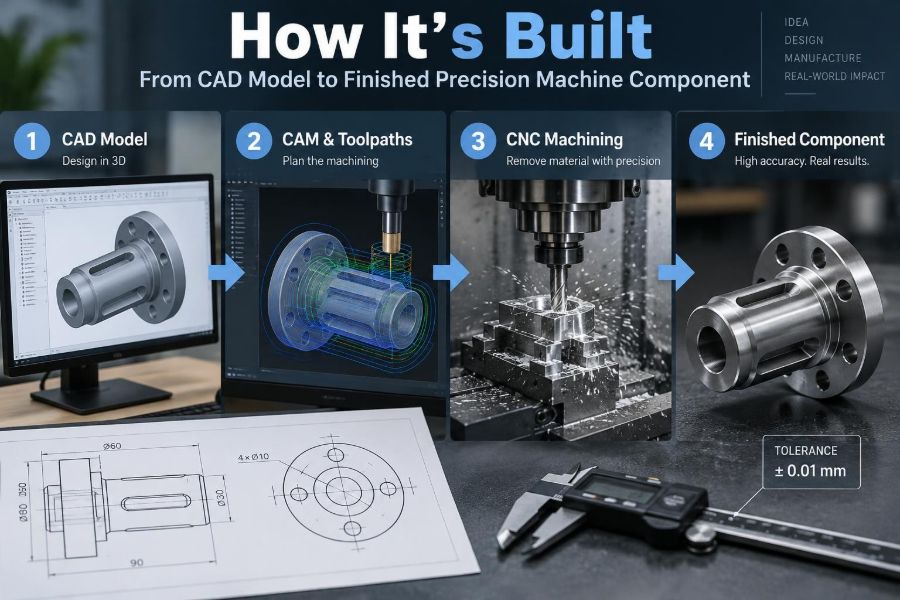

A shaft, valve body, robot bracket, or bearing housing may look simple once it is installed inside a machine. Its visible shape rarely reveals the decisions behind it: which surfaces locate other parts, where a cutting tool can reach, how tightly a bore must be controlled, or how the part will be measured.
Consider a small aluminum mounting plate that fails to assemble because two holes are only slightly misplaced. Nothing may look obviously wrong, yet a motor will not sit flat, a belt will not align, and the shop may need to remake the part. Precision manufacturing is largely the discipline of preventing that expensive surprise.
The route from a CAD model to a finished component is not a single “print” command. It is a chain of design, planning, material handling, machining, inspection, and communication steps. Each step defines what the next one can achieve.
Following that chain makes drawings easier to create, machine-shop conversations clearer, and finished parts more reliable. Whether you are learning CAD or reviewing a supplier’s first article, the same practical logic applies.
🧩 Start With the Component’s Job
Manufacturing begins by asking what the component must do, not merely what shape it should have. A bracket may support a load, position a sensor, resist vibration, or conduct heat away from an actuator. Those functions determine which dimensions matter most.
For example, a cosmetic outer edge might tolerate a modest variation, while the distance between two bearing bores may govern shaft alignment. Treating every dimension as equally critical adds cost without improving function.
📦 Define the Interfaces Before the Shape
An interface is where the component meets something else: a mating face, fastener, shaft, seal, electrical connector, or assembly fixture. These interfaces should be identified early because they become the natural candidates for datum features and controlled dimensions.
A useful mental model is an adapter plate. Its overall outline can be flexible within reason, but its hole pattern, flat mounting face, and clearance around connectors must agree with neighboring parts. The model should make those relationships explicit.
📐 Build a Parametric CAD Model
Most mechanical CAD systems use parametric modeling, where dimensions and geometric relationships drive the solid model. Change a hole spacing parameter, for instance, and connected features update rather than requiring a complete redraw.
Good models reflect design intent. Symmetric features should be constrained symmetrically; repeated holes should use patterns; related sizes can reference shared parameters. This makes revisions safer and lets another engineer understand why geometry exists where it does.
🧭 Choose Datums That Match Assembly Reality
A datum is a theoretically exact reference used to locate or orient a part for manufacturing and inspection. On a drawing, datum labels define the reference framework. In the shop, a machinist needs practical surfaces or features that can establish that framework.
For a rectangular housing, one broad mounting face may be datum A, a perpendicular side datum B, and an end face datum C. This sequence reflects how the part can be placed against a fixture: first rested, then pushed sideways, then stopped lengthwise.
📏 Apply Tolerances Where Function Needs Them
A tolerance states the permitted variation from a nominal size or location. No manufacturing process produces perfectly identical parts, so tolerances define an acceptable functional range rather than demanding impossible perfection.
A hole intended for a loose clearance bolt needs a different tolerance from a bore that locates a precision dowel pin. Tightening dimensions indiscriminately can require slower machining, more inspection, specialized tooling, or rejected material. Specify the precision the function needs, not the precision that looks impressive.
⭕ Use GD&T to Control Geometry, Not Just Size
Geometric dimensioning and tolerancing, often called GD&T, controls properties such as position, flatness, perpendicularity, and profile relative to datums. A diameter tolerance alone does not tell a manufacturer whether a hole is correctly located or square to a mounting surface.
For example, a positional tolerance can define the allowable zone for a bolt-hole axis relative to datum references. This is often more meaningful than placing separate plus-or-minus coordinate tolerances on each hole, especially when parts must assemble interchangeably.
🗂️ Turn the Model Into an Unambiguous Drawing
A 3D model communicates form well, but a production drawing or model-based definition communicates requirements. It should identify material, critical dimensions, tolerances, surface requirements, threads, finishes, revision status, and any notes essential to acceptance.
A common mistake is assuming “the machine shop will know.” Experienced manufacturers can resolve many details, but undocumented assumptions are not controlled requirements. Clear documentation protects both the designer and the manufacturer from producing different interpretations of the same part.
🔍 Run a Manufacturability Review Early
Design for manufacturability, or DFM, checks whether a component can be made reliably with available processes. This review is most valuable before material is cut, when a radius, wall thickness, or feature orientation can still be changed quickly.
- Can standard tools reach every required surface?
- Are internal corners compatible with cutter radii?
- Can the workpiece be clamped without hiding critical features?
- Do thin sections risk bending under cutting forces?
- Are tolerances appropriate for the selected process?
DFM is not solely a cost-cutting exercise. It connects design intent to physical constraints.
🧱 Select Material for Service and Manufacture
Material selection balances mechanical behavior, environment, weight, cost, availability, and machinability. Aluminum alloys are often chosen for low mass and generally efficient machining; steels can offer higher strength or wear resistance; stainless grades may be chosen for corrosion resistance but can behave differently under cutting.
The exact grade and condition matter. Heat treatment, supplied form, and certification requirements can affect machining response and final properties. A material callout should be specific enough for the application while allowing sensible substitution procedures when appropriate.
📏 Choose Stock With Machining Allowance
Most machined components start as bar, plate, block, tube, forging, casting, or near-net additive blank. The starting stock must be large enough to clean up all external surfaces while avoiding unnecessary material removal.
A plate cut close to final size may leave no allowance to remove saw marks, distortion, or edge damage. Conversely, excessively oversized stock increases cycle time, tool wear, chips, and handling effort. Shops commonly plan a practical allowance based on stock condition and process sequence.
🧾 Confirm Material Identity and Condition
Before production, the shop must keep the physical material tied to the specified material. This can involve labels, purchase records, batch identification, or material certificates when the job requires traceability.
Material mix-ups are especially problematic when similar-looking metals have very different corrosion, hardness, magnetic, or heat-treatment behavior. The risk is not solved by appearance alone. Controlled identification matters from receiving through final shipment.
🧠 Plan the Route Through the Shop
Process planning converts the drawing into an ordered sequence of operations. A planner decides which machine types, tools, fixtures, inspections, outside processes, and setups are needed. The plan also considers where a part should be measured before a later operation hides or changes a reference feature.
A typical route may include cutting stock, facing datum surfaces, rough machining, stress-relief treatment when needed, finish machining, deburring, surface treatment, final inspection, and packaging. The order is purposeful: later steps depend on stable earlier references.
🗜️ Design Workholding That Repeats Reliably
Workholding secures the part while resisting cutting forces without distorting it. Vises, soft jaws, clamps, vacuum fixtures, collets, chucks, and dedicated fixtures all serve this role. The best choice depends on part geometry, quantity, material, and required accuracy.
Clamping a thin cover too tightly can bend it. If the part is machined while bent, it may spring back after release and fail flatness requirements. Good workholding applies support and force where they stabilize the part without corrupting the dimensions being created.
🔄 Minimize Setups, but Do Not Force It
A setup is one arrangement in which a workpiece is located and held on a machine. Every new setup introduces an opportunity for location error, so completing related features in one setup often improves their relationship.
However, fewer setups are not automatically better. A difficult all-in-one fixture may be less stable or less inspectable than two simple, repeatable setups. The practical goal is to preserve critical relationships while keeping access, rigidity, and verification under control.
💻 Program Toolpaths With the Real Process in Mind
Computer-aided manufacturing software, or CAM, generates toolpaths from CAD geometry and machining choices. It calculates cutter movement, feed rate, spindle speed, entry paths, depths of cut, and operations such as pocketing, contouring, drilling, and finishing.
CAM output is only as sound as the assumptions behind it. Tool length, holder clearance, cutter engagement, machine travel, and workholding geometry must be considered. A simulated path that avoids the digital part can still collide with a clamp or spindle in the real setup.
🧪 Simulate Before Cutting Metal
Simulation can check material removal, detect many collisions, estimate machining time, and reveal areas that have not been reached by the cutter. It is particularly useful for multi-axis work and complex fixtures, where visualizing every motion manually is difficult.
Simulation reduces risk but does not replace setup verification. Digital models may omit a damaged clamp, incorrect tool offset, unexpected stock variation, or a fixture assembled differently from its model. The first physical run still deserves careful attention.
🪚 Rough Machine for Stability and Efficiency
Roughing removes most excess material quickly, leaving stock for later finishing. The objective is controlled, efficient removal rather than final appearance. Tool selection, chip evacuation, coolant delivery, and machine rigidity strongly affect this stage.
Removing material can release internal stresses from rolling, forging, casting, or prior processing. A part may move slightly after roughing. Leaving finishing allowance allows the final operations to restore critical dimensions and surfaces after much of that movement has occurred.
✨ Finish Machine Critical Features
Finishing cuts bring selected surfaces to final size, geometry, and surface condition. Bores, bearing seats, sealing faces, precision hole patterns, and datum surfaces often receive special attention because they directly affect assembly performance.
Surface finish is not simply visual polish. A sealing face may need a controlled texture to work with a gasket; a sliding feature may need a finish compatible with lubrication and wear. The drawing should state a requirement only where it has a functional reason.
🕳️ Create Holes, Threads, and Precision Bores Carefully
“A hole” can mean several very different manufacturing tasks. A drill creates a starting hole, but a reamer may improve size and finish, a boring tool may correct location and diameter, and a thread mill or tap may create internal threads.
| Feature | Typical purpose | Key consideration |
|---|---|---|
| Clearance hole | Lets a fastener pass through | Size must suit fastener and assembly tolerance |
| Dowel hole | Locates mating components | Position and fit are usually critical |
| Threaded hole | Receives a fastener | Thread depth, engagement, and chamfer matter |
| Precision bore | Locates a shaft or bearing | Diameter, roundness, and surface condition may matter |
Calling out the intended function helps determine the right operation rather than treating all holes alike.
🌡️ Manage Heat, Chips, and Tool Wear
Cutting converts energy into heat. Excessive heat can shorten tool life, alter dimensions during machining, damage surface quality, or create built-up material on a cutting edge. Coolant, air, lubrication, cutting parameters, and chip-control strategy are selected for the material and operation.
Chips are not harmless debris. Long stringy chips can wrap around tools or parts; packed chips can interfere with drilling; sharp chips create handling hazards. A stable process plans how chips leave the cutting zone instead of hoping they will clear themselves.
📈 Control Variation During Production
Even a validated first piece does not guarantee every later piece will match it. Tool wear, thermal growth, changing material, fixture contamination, and operator handling can shift a process over time.
For repeated production, shops may use in-process probing, tool-life controls, scheduled measurements, or statistical process control where the production volume and risk justify it. The central idea is to detect drift before it produces a batch of nonconforming components.
📐 Inspect Against the Same Datum Scheme
Inspection is meaningful only when the part is measured from the references that define its function. If a coordinate-measuring machine, height gauge, or fixture locates the part differently from the drawing’s datum scheme, a correct feature may appear wrong—or the reverse.
Common tools include calipers, micrometers, bore gauges, pin gauges, thread gauges, height gauges, surface plates, and coordinate-measuring machines. Tool choice follows the feature, tolerance, accessibility, and required confidence; a caliper is not a universal precision instrument.
✅ Separate Inspection From Assumption
Visual checks can identify burrs, scratches, missing features, and obvious damage, but they cannot confirm all requirements. A bore may look round while being oversized; a face may look flat while exceeding its allowable variation.
An inspection plan should identify critical characteristics, measurement method, sampling or frequency where applicable, and acceptance criteria. For high-consequence parts, the plan may require records that show actual measured values rather than a simple pass/fail mark.
🪵 Deburr Without Damaging Edges
Machining commonly leaves burrs: thin, sharp projections created as material separates. Deburring removes these hazards and prevents loose fragments, poor assembly seating, or interference with mating parts.
Deburring must be controlled. Aggressively rounding an edge can remove a functional corner, alter a dimension, or weaken a seal land. A drawing may specify an edge break or chamfer where needed, but vague instructions such as “remove all sharp edges” require sensible interpretation and communication.
🛡️ Apply Finishes for Function, Not Decoration
Finishes may improve corrosion resistance, wear behavior, appearance, electrical properties, or cleanability. Examples include anodizing aluminum, plating selected metals, applying paint or powder coating, and passivating suitable stainless steels.
These processes can affect dimensions, thread fit, electrical contact, and surface texture. A coating applied after machining may require masking, allowance in a fit, or post-process thread cleaning. The finish must be planned as part of the design, not added as an afterthought.
📦 Protect the Part After It Passes Inspection
A component can meet every dimensional requirement and still arrive unusable if threads are damaged, precision faces are scratched, or corrosion begins during storage. Packaging is therefore part of quality control.
Protection might include caps for threads and bores, separators between machined faces, corrosion-inhibiting materials where appropriate, labeled bags, and rigid containers for delicate parts. Packaging should also preserve identity so the component, revision, and inspection status remain clear.
🔁 Handle Nonconformance and Rework Deliberately
When a feature falls outside requirement, the part should be identified and separated rather than quietly passed along. The next step may be rework, repair assessment, use-as-is review by authorized engineering personnel, or rejection, depending on the requirement and the defect.
Rework can create new risks. Enlarging a hole may solve one issue but compromise fastener fit; polishing a surface may improve appearance but remove material. A controlled decision considers the actual function, documentation, and downstream consequences.
🗣️ Keep Design, Manufacturing, and Quality Connected
Many avoidable problems are communication failures rather than failures of machining capability. A designer may intend a locating fit, a programmer may see only an ordinary hole, and an inspector may lack a clear datum interpretation.
Early conversations can resolve questions about tolerances, stock availability, inspection access, special tooling, and finishing. Feedback from the shop is valuable design information: it reveals where the model supports a repeatable process and where it creates unnecessary uncertainty.
🧰 Common Design Choices That Raise Cost or Risk
Several features deserve an extra DFM review because they frequently complicate machining:
- Deep, narrow pockets that require long tools and may chatter.
- Sharp internal corners that standard rotary cutters cannot produce.
- Very thin walls that deflect during clamping or cutting.
- Unnecessarily tight tolerances on nonfunctional dimensions.
- Threads placed too close to edges or at inaccessible depths.
- Features requiring multiple awkward reorientations of the part.
None is automatically wrong. Each may be justified by performance, but each should be intentional and discussed before release.
🚀 The Core Principle: Design the Process, Not Only the Part
A precision component succeeds when its functional intent survives every handoff: from CAD constraints to drawing requirements, from datum selection to workholding, from toolpath to inspection, and from finished surface to protected delivery.
The strongest designs make that path understandable. They identify what must be accurate, permit reasonable variation elsewhere, use references that can be recreated in the shop, and anticipate how the component will be held, machined, measured, assembled, and maintained.
Precision is not created at one machine; it is built into a connected, verified process from the first CAD decision onward. When design and manufacturing share that mindset, finished parts are more likely to fit, function, and be made repeatably. ⚙️📐🔧